Windows desktop app + OBS plugin

Cammodelkit enhances interactive Chaturbate shows.

The OBS plugin adds video and audio filters, sources, docks, and stream recovery tools. The desktop app handles Chaturbate chat, tip menus, queues, games, overlays, reactions, devices, sounds, and stats.

Windows x64 Version 1.0.9 109.8 MB Desktop app Native OBS plugin

Windows x64 installer · v1.0.9 · 109.8 MB · Updated May 9, 2026

OBS filters

What each filter does

These OBS filters are built for live shows: fast, best-in-class effects for video, audio, and event detection that will not bog down your stream.

Peepshow

Censor and reveal your naughty bits

Adds body-aware pixelation and cover effects. Use it for tease, tip goals, timers, and paid reveal moments.

Demo: @auragotchi

Analog Video + Audio

Add VHS video and worn tape sound

Adds VHS/NTSC image damage plus tape-style audio: chroma bleed, dot crawl, scanlines, tracking snow, wobble, hiss, wow/flutter, dropouts, muffling, hum, and saturation.

Aura

Add a fast beauty filter

Smooths skin, reduces redness, softens blemishes, and tones down noisy or overly sharp webcam detail while keeping the feed natural.

Sanguine

Apply a dark, nocturnal character look

Changes pallor, contrast, red tones, and shadows for goth, vampire, horror, fantasy, or costume scenes.

Dopplebanger

Double the person on camera

Detects the person in the frame and creates a second copy beside them, so one performer can appear doubled in the scene.

Background Erase

Remove or blur the background

Cuts you out without a green screen, or keeps the room and applies fake bokeh blur to make the background less distracting.

Emotion Detector

Detect faces, emotion, and laughter

Analyzes the camera without changing the video. It can report emotion and laughter events to Cammodelkit for reactions.

Desktop app

What the app does

The desktop app is where you configure the show. It watches Chaturbate activity, tracks requests, and sends actions to OBS, overlays, sounds, toys, lights, and other connected tools.

  • Setup checks for Chaturbate, OBS, overlays, devices, and stream tools
  • Multi-account Chaturbate chat with saved chat history
  • Tip menus, tip matching, and fulfillment queues
  • Games and actions for OBS filters, overlays, sounds, speech, toys, lights, and stats
Cammodelkit browser docks shown inside OBS
Browser docks put app controls inside OBS.
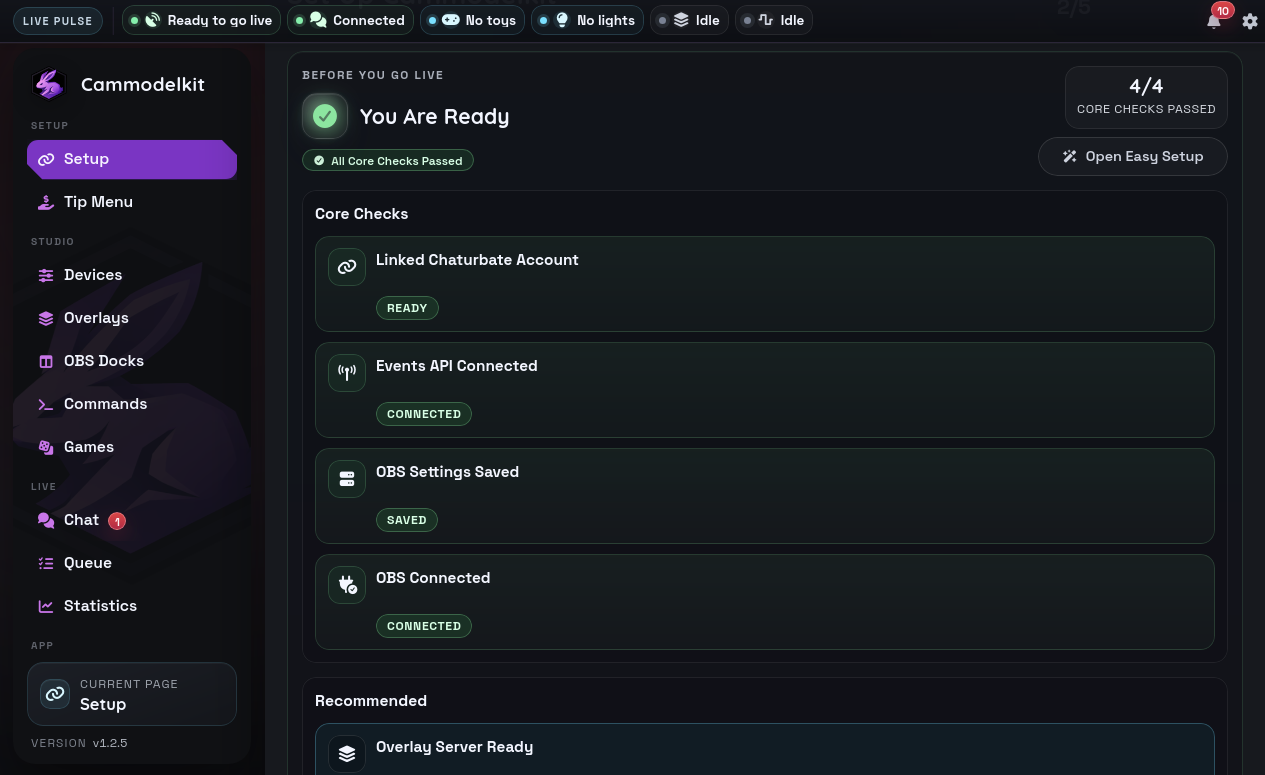
Setup

Easy streamlined setup

See whether Chaturbate, OBS, the OBS plugin, overlays, devices, and stream tools are connected before you go live.

Chat

Read Chaturbate chats in one place

Link multiple Chaturbate accounts, keep their room chats open, and use saved chat history when you need context.

Tip menus

Map tips to actions

Create tip items, detect matching tips, and keep a queue of requests that still need to be fulfilled.

Soundboard tips

Play sounds when tips match

Matching tip amounts can play local sound files, spoken lines, or AI prompts. Sounds can also trigger from follows and specific users entering or leaving chat.

Reactions

Trigger what should happen next

Tips, goals, joins, follows, music, and manual buttons can trigger OBS filters, overlays, lights, and other show actions.

Toys

Supports around 750 toy models

Connect supported Bluetooth toys or Lovense Connect devices, then drive vibration, rotation, strokes, and patterns from tips, games, music, or buttons.

Clips + screenshots

Autoclipping and command captures

Set token rules so matching tips automatically start timed OBS clips. Broadcaster or moderator chat commands like !clipthis and !screenshot can also capture clips or screenshots on demand.

Overlays

Put show data on stream

Display alerts, chat, tip queues, top tippers, goals, stats, now playing text, and other live widgets in OBS.

Stats

Review what happened

Track spending, repeat viewers, busy windows, goals, and activity so you can adjust your menu and pacing after the show.

App games

Games present in the app

Games are automations you turn on from the desktop app. They listen to tips, OBS audio, or the Emotion Detector filter and then trigger toys or OBS filter changes.

Musical Toys

Make toys react to music

Uses the CamModelKit Sinphony source in OBS. The app reads the music meter and drives connected toys from the beat and level.

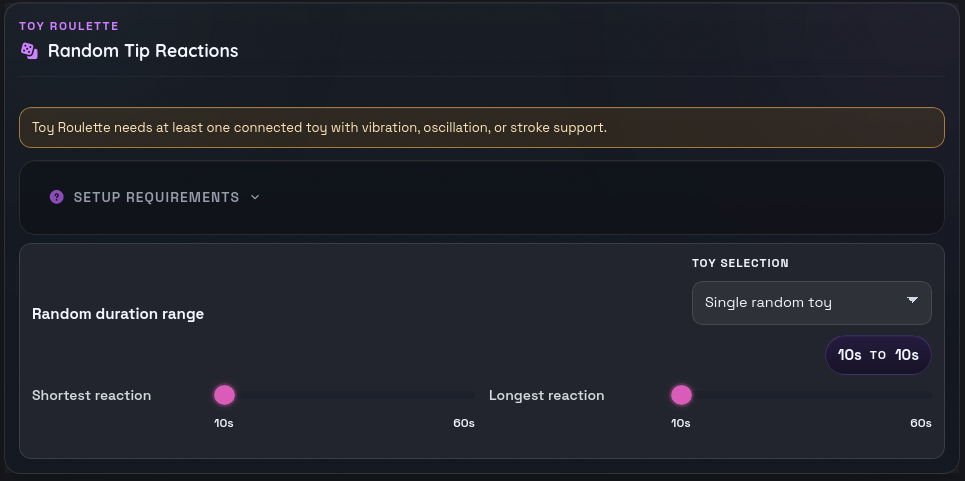
Toy Roulette

Randomize toy reactions from tips

Each incoming tip picks a random reaction level and duration. You can hit one random toy or all connected toys.

Peepshow

Let tips change censor bubbles

Connects to the Peepshow OBS filter. Viewers can tip to pop censor bubbles away or add more bubbles back.

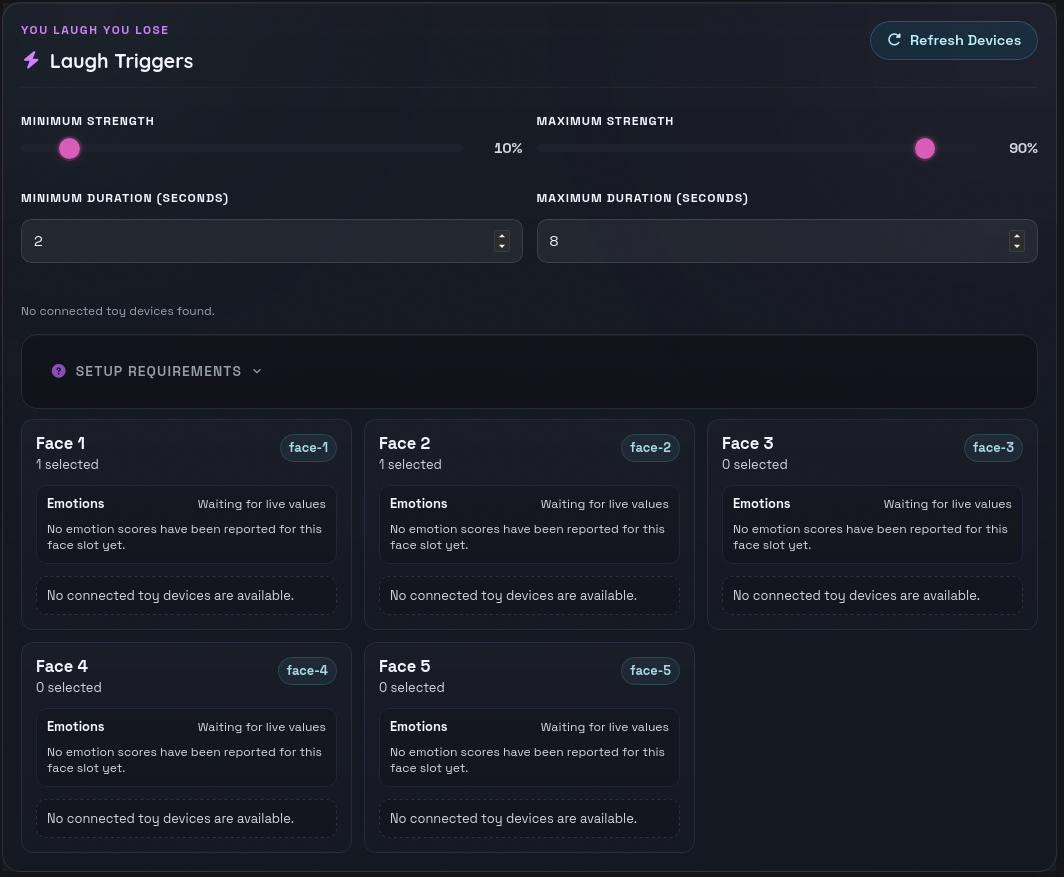
You Laugh You Lose

Trigger toys when laughter is detected

Uses the CamModelKit Emotion Detector filter. Assign toys to face slots, then laughter triggers the selected toys.

Plugin tools

Other things the OBS plugin adds

The installer includes the native OBS plugin. Besides filters, it adds room sources, browser docks, audio hooks, and stream recovery tools.

  • OBS sources for Chaturbate room and collab layouts
  • OBS browser docks for app controls
  • Stream Guardian monitoring for unstable output
Chaturbate room source

Add room video and audio to OBS

Bring Chaturbate room video, friend cams, collabs, guest layouts, and linked room audio into OBS.

Browser docks

Put app controls inside OBS

Open Cammodelkit controls as OBS docks so queues, status, and show tools are available beside the preview.

Sinphony/music source

Use room audio for reactions

Route music data into Cammodelkit so beat-aware toy, light, or visual reactions stay synced.

Stream Guardian

Watch OBS output health

Monitors stream output and recovery state so reconnect behavior is handled more carefully when OBS gets unstable.

Download

Get the Windows build

The installer includes the desktop app and the Cammodelkit OBS plugin.

  • Windows x64 installer
  • Current release metadata from the update manifest
  • App setup and OBS plugin installation support
FAQ

Before you install

Is Cammodelkit a browser app?

No. It is a Windows desktop app. The installer also includes the Cammodelkit OBS plugin.

What do I need to use it?

You need Windows, OBS, OBS WebSocket, and a linked Chaturbate account. Toys, lights, speech, RF hardware, and other devices are optional.

What does the OBS plugin add?

It adds video filters, audio filters, room sources, browser docks, and Stream Guardian tools directly inside OBS.

What does the desktop app do?

It manages setup checks, Chaturbate chat, tip menus, queues, reactions, overlays, devices, sounds, stats, and OBS connection settings.

Does every feature require hardware?

No. You can use chat, queues, OBS filters, overlays, sounds, and stats without extra hardware.